Avis sur Tuberipper : est-ce que ça vaut le coup ?

Le téléchargement de vidéos en ligne peut s'avérer utile pour regarder du contenu hors ligne, enregistrer des vidéos pour un usage personnel ou extraire l'audio de sites web compatibles. Parmi les nombreux téléchargeurs basés sur un navigateur disponibles aujourd'hui, Écrêteur de tubercules elle se distingue par son approche simple basée sur les URL et sa prise en charge de multiples formats vidéo et audio.
Tuberipper vaut-il vraiment le coup ? Offre-t-il suffisamment de fonctionnalités pour des téléchargements réguliers ? Est-il sûr ? Dans cet avis sur Tuberipper, nous examinerons en détail ce que le service propose, son fonctionnement, ses avantages et ses limites, et nous verrons s’il est préférable d’envisager une alternative.
1. Qu'est-ce que Tuberipper ?
Tuberipper est un service de téléchargement de vidéos et d'audio en ligne qui permet aux utilisateurs de télécharger du contenu en collant l'URL d'une vidéo sur son site web. Principalement axé sur le téléchargement de vidéos YouTube, le service indique également prendre en charge plus de 100 sites web populaires, dont Facebook, Twitter, Instagram, Dailymotion, TikTok, SoundCloud, Pinterest et Vimeo.
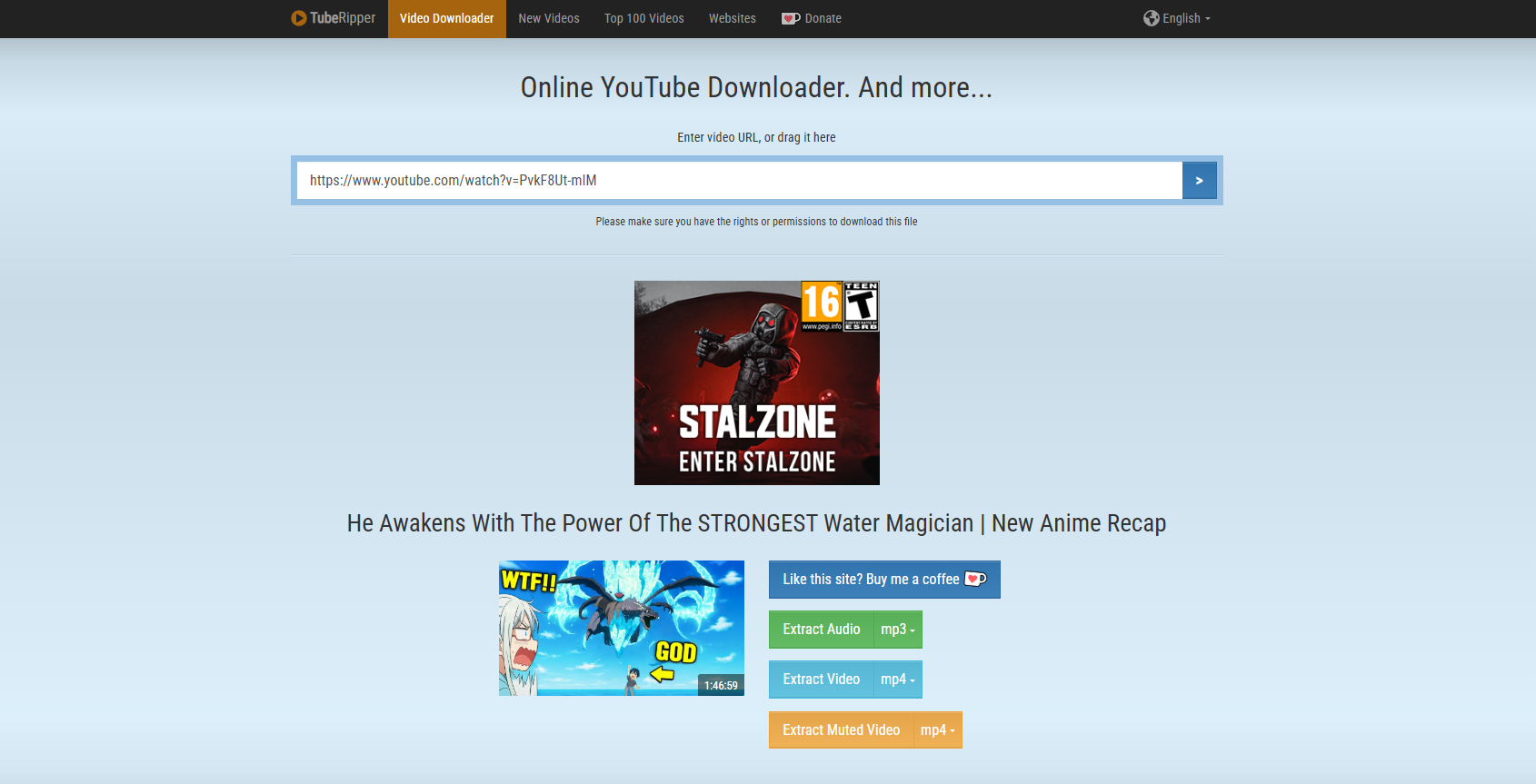
L'un des principaux avantages de Tuberipper est qu'il ne nécessite aucune installation de logiciel ou d'extension de navigateur. Il suffit d'ouvrir le site web dans un navigateur, de coller l'URL d'une vidéo compatible, de sélectionner un format de sortie et de lancer le téléchargement.
Principales caractéristiques de Tuberipper :
- Téléchargement en ligne : Téléchargez le contenu directement via un navigateur web sans installer de logiciel.
- Fonctionne partout : Compatible avec les appareils Windows, Mac, Android et iOS.
- Téléchargements MP4 et MP3 : Enregistrez les vidéos au format MP4 ou extrayez l'audio au format MP3.
- Formats multiples : Parmi les autres formats répertoriés figurent FLAC, WAV, OGG, OPUS, M4A, WebM et 3GP.
- Téléchargements de haute qualité : Offre un son et une vidéo haute définition lorsque disponibles.
- Plus de 100 sites web pris en charge : Permet de télécharger des fichiers depuis un large éventail de sites web populaires.
2. Tuberipper est-il sûr ?
Tuberipper s'utilise directement depuis un navigateur web, sans installation de logiciel supplémentaire. Toutefois, il est conseillé aux utilisateurs d'éviter les publicités et redirections suspectes et de ne télécharger que le contenu dont ils possèdent les droits d'utilisation. Tuberipper rappelle d'ailleurs à ses utilisateurs de vérifier qu'ils disposent des autorisations nécessaires.
3. Comment utiliser Tuberipper ?
L'un des principaux atouts de Tuberipper est sa simplicité de téléchargement. Nul besoin de maîtriser des réglages complexes ni d'installer de logiciel supplémentaire.
Suivez ces étapes :
- Copiez l'URL de la vidéo – Ouvrez le site web compatible et copiez l'URL de la vidéo que vous souhaitez télécharger.
- Éventail ouvert – Visitez le site web Tuberipper en utilisant votre navigateur préféré.
- Collez l'URL – Insérez le lien copié dans le champ URL de la vidéo.
- Démarrez le processus – Cliquez sur le bouton situé à côté du champ URL pour commencer l'analyse du contenu.
- Choisissez un format – Sélectionnez MP4, MP3 ou un autre format disponible en fonction de vos besoins.
- Télécharger le fichier – Cliquez sur le bouton de téléchargement et attendez que le fichier converti soit enregistré sur votre appareil.
4. Avantages et inconvénients de Tuberipper
Avantages :
- Facile à utiliser
- Aucune installation requise
- Compatible avec de nombreux sites web
- Formats audio et vidéo multiples
- Fonctionne sur différents appareils
Inconvénients :
- L'utilisation gratuite est soumise à des limites.
- Nécessite une connexion internet
- Moins de fonctionnalités avancées que les logiciels de bureau
- Moins pratique pour les téléchargements à grande échelle
5. Essayez le téléchargeur de vidéos ultime : Meget
Si vous recherchez une solution plus complète, Très Meget mérite d'être pris en considération. Contrairement à Tuberipper, qui fonctionne via un navigateur, Meget est un outil dédié au téléchargement et à la conversion de vidéos, de listes de lecture et de fichiers audio depuis une vaste gamme de sites web.
Meget prend en charge le téléchargement par URL et peut traiter des vidéos individuelles ainsi que des listes de lecture entières. Son guide officiel propose également des options pour choisir les formats de sortie et télécharger plusieurs vidéos d'une liste de lecture.
Principales caractéristiques de Much :
- Téléchargez plusieurs vidéos ou des listes de lecture entières depuis 10 000 sites.
- Prend en charge les options de qualité vidéo jusqu'à 8K, le cas échéant.
- Convertissez les vidéos et les fichiers audio dans des formats tels que MP4 et MP3.
- Téléchargez l'audio ensemble ou séparément des vidéos compatibles.
- Configurez le format, la qualité, les sous-titres, le dossier de sortie et les autres paramètres.
- Trouvez et téléchargez des fichiers multimédias directement dans l'application.
Comment télécharger des vidéos avec Meget :
- Téléchargez et installez Meget sur votre ordinateur Windows ou Mac.
- Copiez l'URL de la vidéo ou de la liste de lecture depuis un site web compatible.
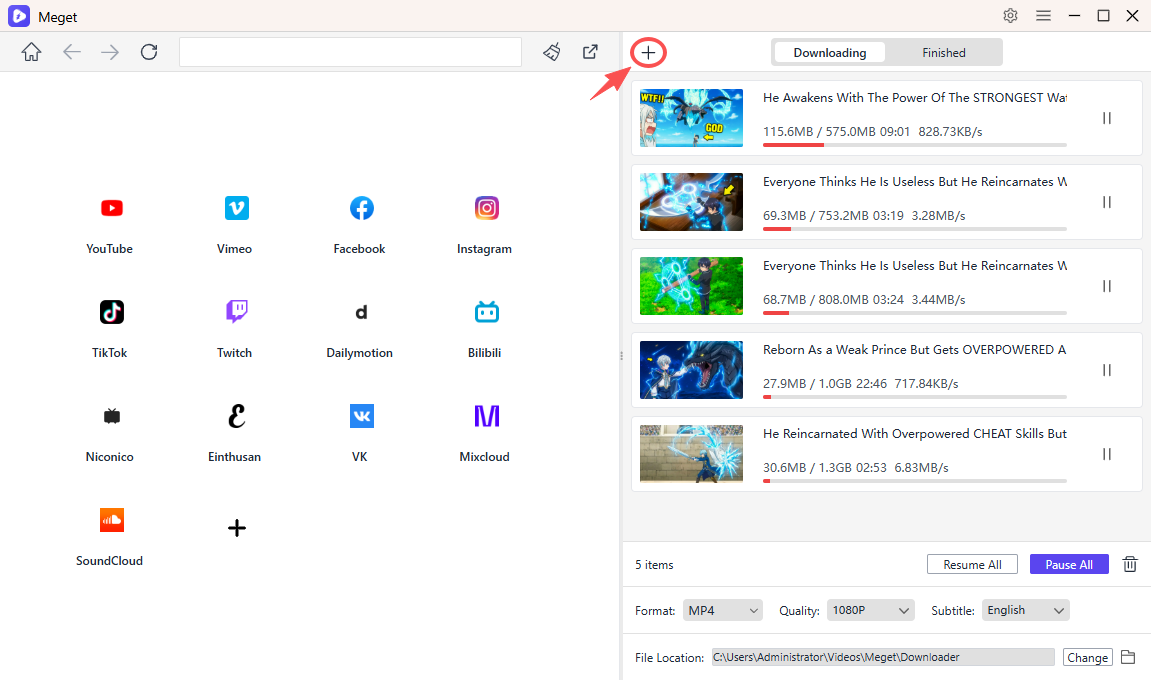
- Ouvrez Meget pour choisir vos paramètres de téléchargement, notamment le format et la qualité, puis collez l'URL en utilisant l'option « Coller l'URL (ou les URL) à télécharger ».
- Sélectionnez les vidéos que vous souhaitez télécharger si l'URL contient plusieurs éléments.
- Meget lancera le téléchargement et vous pourrez suivre et gérer sa progression dans Meget.
6. Conclusion
Tuberipper est une solution pratique pour les utilisateurs qui souhaitent télécharger facilement des vidéos en ligne et en extraire l'audio directement depuis leur navigateur. Son accessibilité multiplateforme, sa compatibilité avec de nombreux formats et son fonctionnement avec de nombreux sites web populaires en font un outil utile pour les téléchargements occasionnels.
Cependant, sa nature en ligne et les limitations de sa version gratuite peuvent la rendre moins adaptée aux personnes qui téléchargent fréquemment des vidéos ou qui ont besoin d'un traitement par lots et d'une personnalisation plus avancée.
Pour ces utilisateurs, Meget est le choix idéal. Grâce au téléchargement par lots et par listes de lecture, à la sortie haute résolution, à la prise en charge de multiples formats, aux paramètres de téléchargement personnalisables et à la compatibilité avec de nombreux sites web, il offre une expérience de téléchargement vidéo plus complète.
Si vous n'avez besoin de télécharger des vidéos qu'occasionnellement, Tuberipper peut suffire. Mais si vous souhaitez un logiciel de téléchargement plus puissant et plus flexible pour une utilisation régulière, Très mérite d'être essayé comme alternative à Tuberipper.
- Téléchargement yt-dlp Audio uniquement. Mauvaise qualité audio ? Améliorez-la avec ces solutions.
- Les extensions de téléchargement de vidéos avec DRM fonctionnent-elles vraiment ? Essayez ces outils alternatifs.
- Comment corriger le code d'erreur 152-18 du téléchargeur de vidéos 4K ?
- Meilleures alternatives à CocoCut pour télécharger des vidéos : ce que vous devriez essayer
- Comment télécharger des films depuis Movies2Watch ?
- Présentation de GenYouTube : Guide complet de ses fonctionnalités et de son utilisation
- Téléchargement yt-dlp Audio uniquement. Mauvaise qualité audio ? Améliorez-la avec ces solutions.
- Les extensions de téléchargement de vidéos avec DRM fonctionnent-elles vraiment ? Essayez ces outils alternatifs.
- Comment corriger le code d'erreur 152-18 du téléchargeur de vidéos 4K ?
- Meilleures alternatives à CocoCut pour télécharger des vidéos : ce que vous devriez essayer
- Comment télécharger des films depuis Movies2Watch ?
- Présentation de GenYouTube : Guide complet de ses fonctionnalités et de son utilisation