La liste ultime des meilleurs XDownloaders pour télécharger des vidéos X

X, anciennement connu sous le nom de Twitter, regorge de courtes vidéos, d'actualités, de résumés sportifs, de mèmes, de tutoriels, de divertissements et d'autres types de contenus vidéo. Si regarder des vidéos sur X est facile, les enregistrer pour les visionner hors ligne peut s'avérer plus complexe.
C'est là qu'interviennent les téléchargeurs de vidéos X. Ces outils vous permettent d'enregistrer des vidéos X accessibles au public sur votre ordinateur ou appareil mobile. Dans ce guide, nous explorerons quelques téléchargeurs de vidéos X populaires dans chaque catégorie, expliquerons comment les utiliser et comparerons leurs avantages et leurs limites.
1. Meilleur logiciel de téléchargement de vidéos X pour ordinateur – Meget
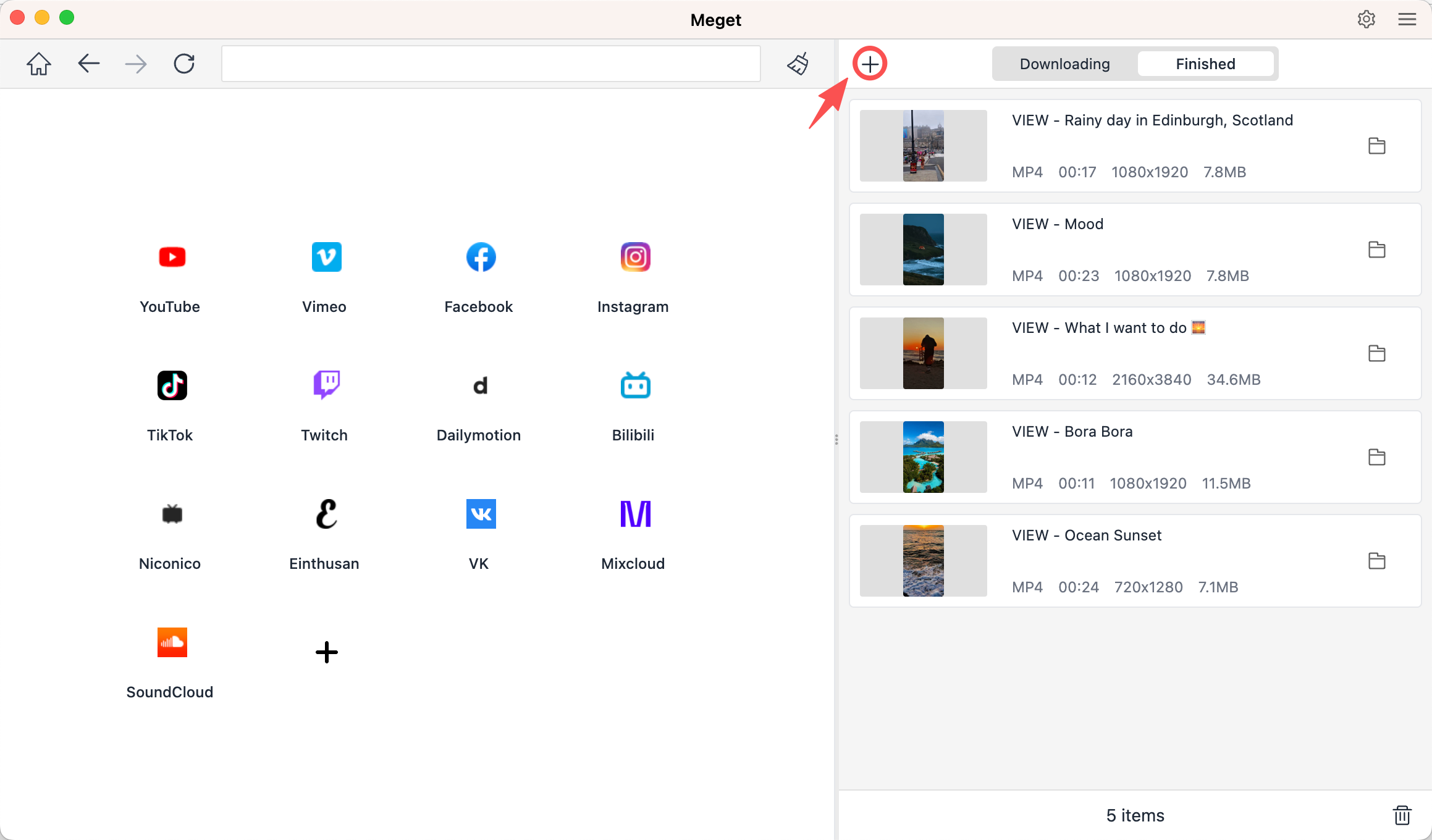
Pour les utilisateurs qui téléchargent régulièrement des vidéos X, un logiciel de bureau dédié peut offrir une expérience plus pratique que les outils basés sur un navigateur. Très est un logiciel de téléchargement et de conversion de vidéos pour ordinateur qui prend en charge X et divers autres sites web populaires.
Comme Meget s'exécute localement sur votre ordinateur, il offre davantage de contrôle sur les téléchargements que la plupart des services en ligne de base. Il est particulièrement utile si vous devez télécharger plusieurs vidéos simultanément plutôt que de traiter les URL une par une.
Principales caractéristiques de beaucoup :
- Prend en charge le téléchargement de vidéos X.
- Compatible avec plusieurs sites web vidéo populaires.
- Idéal pour télécharger plusieurs vidéos efficacement.
- Offre différentes options de qualité et de format.
- Disponible pour Windows et Mac.
Comment télécharger des vidéos X avec Meget :
- Installez l'application Meget sur votre ordinateur Windows ou Mac.
- Ouvrez Meget et configurez votre format de sortie, votre qualité et votre emplacement d'enregistrement préférés.
- Ouvrez X, trouvez les vidéos que vous souhaitez télécharger et copiez leurs liens.
- Retournez sur Meget et cliquez sur « + » pour coller tous les liens ; Meget ajoutera toutes les vidéos à la liste de téléchargement et lancera le téléchargement.
2. Les meilleurs sites de téléchargement de vidéos X en ligne
Les téléchargeurs X en ligne sont une bonne option si vous ne souhaitez pas installer de logiciel. Il vous suffit d'ouvrir un site web dans votre navigateur, de coller l'URL de la vidéo X et de télécharger le fichier disponible.
Choix populaires :
- SSSTwitter.com
- X-Downloader.com
- SSSx.io
Mesures:
- Ouvrez X et repérez la publication contenant la vidéo, puis cliquez sur Partager et copiez le lien de la publication.
- Ouvrez un site XDownloader en ligne comme SSSTwitter et collez l'URL X dans la zone de saisie.
- Cliquez sur le bouton de téléchargement, puis sélectionnez une qualité vidéo disponible et enregistrez le fichier.

Avantages :
- Aucune installation requise.
- Flux de travail simple basé sur les URL.
- Pratique pour les téléchargements occasionnels.
Inconvénients :
- Peut contenir des publicités.
- La qualité des téléchargements disponibles peut varier.
- Il arrive que les services en ligne cessent occasionnellement de prendre en charge certains liens.
3. Les meilleures extensions XDownloader pour télécharger des vidéos X
Les extensions de navigateur facilitent le téléchargement en intégrant directement le processus dans votre navigateur. Au lieu de copier les URL vers un site web externe, une extension peut détecter les fichiers multimédias disponibles sur la page web actuelle.
Choix populaires :
- Récolte des médias
- Aide au téléchargement de vidéos
- Téléchargeur de vidéos – MPMux
Mesures:
- Installez une extension de navigateur fiable comme Video DownloadHelper.
- Ouvrez X dans votre navigateur, accédez à la publication contenant la vidéo, puis lancez ou chargez la vidéo si nécessaire.
- Cliquez sur l'icône de l'extension Video DownloadHelper pour détecter les fichiers multimédias ; sélectionnez la vidéo appropriée et enregistrez-la sur votre ordinateur.

Avantages :
- Facile et rapide à utiliser
- Aucun logiciel supplémentaire requis
- Fonctionne directement dans le navigateur
- Pratique pour les téléchargements occasionnels
Inconvénients :
- Peut présenter des problèmes de compatibilité
- Fonctionnalités avancées limitées
- Peut cesser de fonctionner après les mises à jour du navigateur ou de X
- Certaines extensions nécessitent des autorisations étendues.
4. Les meilleures applications mobiles XDownloader pour télécharger des vidéos X
Si vous utilisez principalement X sur votre téléphone, un téléchargeur mobile peut s'avérer plus pratique que le transfert d'URL vers un ordinateur.
Choix populaires :
- Téléchargeur de vidéos X Twitter
- VidJuice UniTube
Mesures:
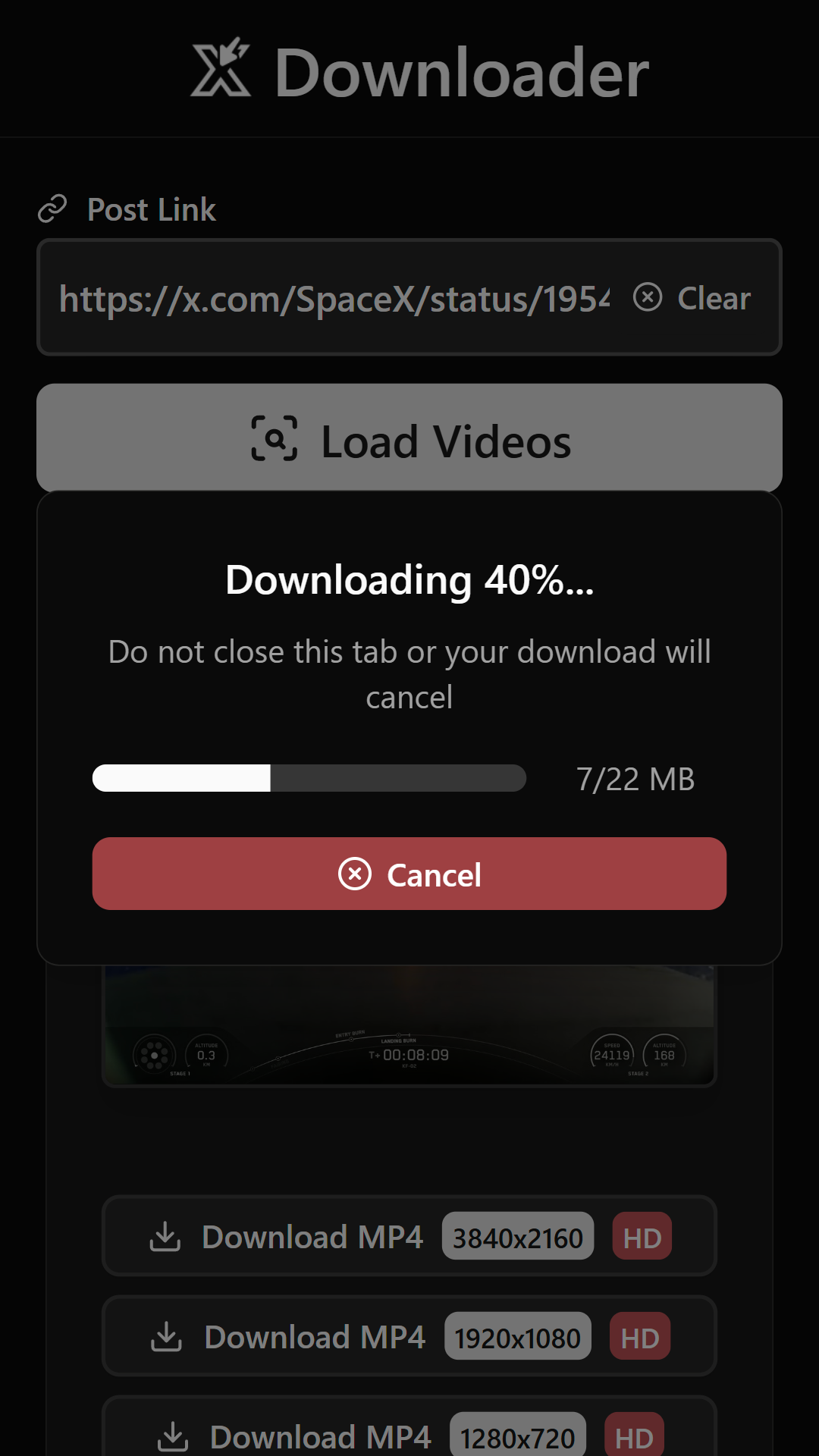
- Ouvrez l'application X sur votre téléphone, trouvez la publication contenant la vidéo que vous souhaitez enregistrer et copiez le lien.
- Ouvrez X Twitter Video Downloader, collez l'URL copiée dans le champ approprié et appuyez sur « Charger les vidéos ».
- Choisissez la qualité vidéo disponible si vous y êtes invité. Une fois le processus terminé, vérifiez les téléchargements ou la galerie de votre appareil.
Avantages :
- Facile à utiliser sur mobile
- Pratique pour télécharger des vidéos en déplacement
- Prend en charge l'enregistrement direct sur l'appareil
- Certaines applications proposent des téléchargements par lots et la gestion des téléchargements
Inconvénients :
- Certaines applications demandent des autorisations étendues sur l'appareil.
- La compatibilité peut varier d'un appareil à l'autre.
- La détection vidéo peut parfois échouer.
5. Conclusion
Il existe de nombreuses façons de télécharger des vidéos X, allant de services en ligne simples comme SSSTwitter et X-Downloader.com à des extensions de navigateur telles que Media Harvest et Video DownloadHelper. Les utilisateurs mobiles peuvent également utiliser X Twitter Video Downloader pour enregistrer directement des vidéos sur leur téléphone.
Pour les utilisateurs qui téléchargent régulièrement des vidéos X, Meget est notre choix recommandé. Son interface utilisateur intuitive, ses fonctionnalités de téléchargement par lots, ses options de format et de qualité, ainsi que sa compatibilité étendue avec de nombreux sites web en font un outil plus polyvalent que la plupart des outils en ligne basiques ou des extensions de navigateur.
Si vous souhaitez une solution dédiée à la gestion des téléchargements fréquents de vidéos X, Très est une option pratique qui mérite d'être essayée.
- Comment corriger le code d'erreur 152-18 du téléchargeur de vidéos 4K ?
- Meilleures alternatives à CocoCut pour télécharger des vidéos : ce que vous devriez essayer
- Comment télécharger des films depuis Movies2Watch ?
- Présentation de GenYouTube : Guide complet de ses fonctionnalités et de son utilisation
- Avis sur Tuberipper : est-ce que ça vaut le coup ?
- Comment résoudre le problème « 4K Video Downloader ne trouve pas de format valide » ?
- Comment corriger le code d'erreur 152-18 du téléchargeur de vidéos 4K ?
- Meilleures alternatives à CocoCut pour télécharger des vidéos : ce que vous devriez essayer
- Comment télécharger des films depuis Movies2Watch ?
- Présentation de GenYouTube : Guide complet de ses fonctionnalités et de son utilisation
- Avis sur Tuberipper : est-ce que ça vaut le coup ?
- Comment résoudre le problème « 4K Video Downloader ne trouve pas de format valide » ?
- Comment résoudre le problème du téléchargeur 4K qui ne fonctionne que pendant 10 secondes ?