Comment télécharger des vidéos Udemy cryptées avec FetchV ?

Udemy a révolutionné la formation en ligne en proposant des milliers de cours vidéo de haute qualité aux apprenants du monde entier. De la programmation à la science des données, en passant par le marketing et le design, le catalogue d'Udemy s'enrichit chaque année. Bien qu'Udemy permette le visionnage hors ligne via ses applications mobiles, de nombreux utilisateurs cherchent encore des solutions pour regarder leurs cours achetés hors ligne sur un ordinateur, archiver les leçons pour un usage personnel ou gérer leurs vidéos de cours de manière plus flexible.
C’est là qu’interviennent les outils de téléchargement vidéo comme FetchV. Dans cet article, nous verrons ce qu’est FetchV, comment l’utiliser pour télécharger des vidéos Udemy cryptées, ses avantages et ses inconvénients, et pourquoi une solution plus avancée est finalement préférable.
1. Qu'est-ce que FetchV ?
FetchV est une solution de téléchargement vidéo et de détection de flux qui s'intègre directement dans les pages web. Au lieu de se fier uniquement aux URL des vidéos, FetchV analyse le chargement des données vidéo sur une page web. De nombreux sites web modernes, y compris les plateformes d'apprentissage, diffusent des vidéos via des formats de streaming adaptatifs tels que HLS ou DASH, qui divisent une vidéo en plusieurs petits segments.
FetchV est léger et ne nécessite pas d'installation complexe, ce qui le rend attrayant pour les utilisateurs qui souhaitent une solution rapide et accessible via navigateur.
2. Comment télécharger des vidéos Udemy cryptées à l'aide de FetchV ?
Les vidéos Udemy sont diffusées en streaming segmenté et crypté afin de protéger la propriété intellectuelle des formateurs. Par conséquent, télécharger une vidéo Udemy est plus complexe que télécharger un fichier MP4 classique.
Vous pouvez toutefois essayer de télécharger des vidéos Udemy chiffrées à l'aide de FetchV en suivant ces étapes :
Étape 1 : Ouvrez fetchv.net et installez la dernière version de FetchV sur votre navigateur Chrome ou Edge.
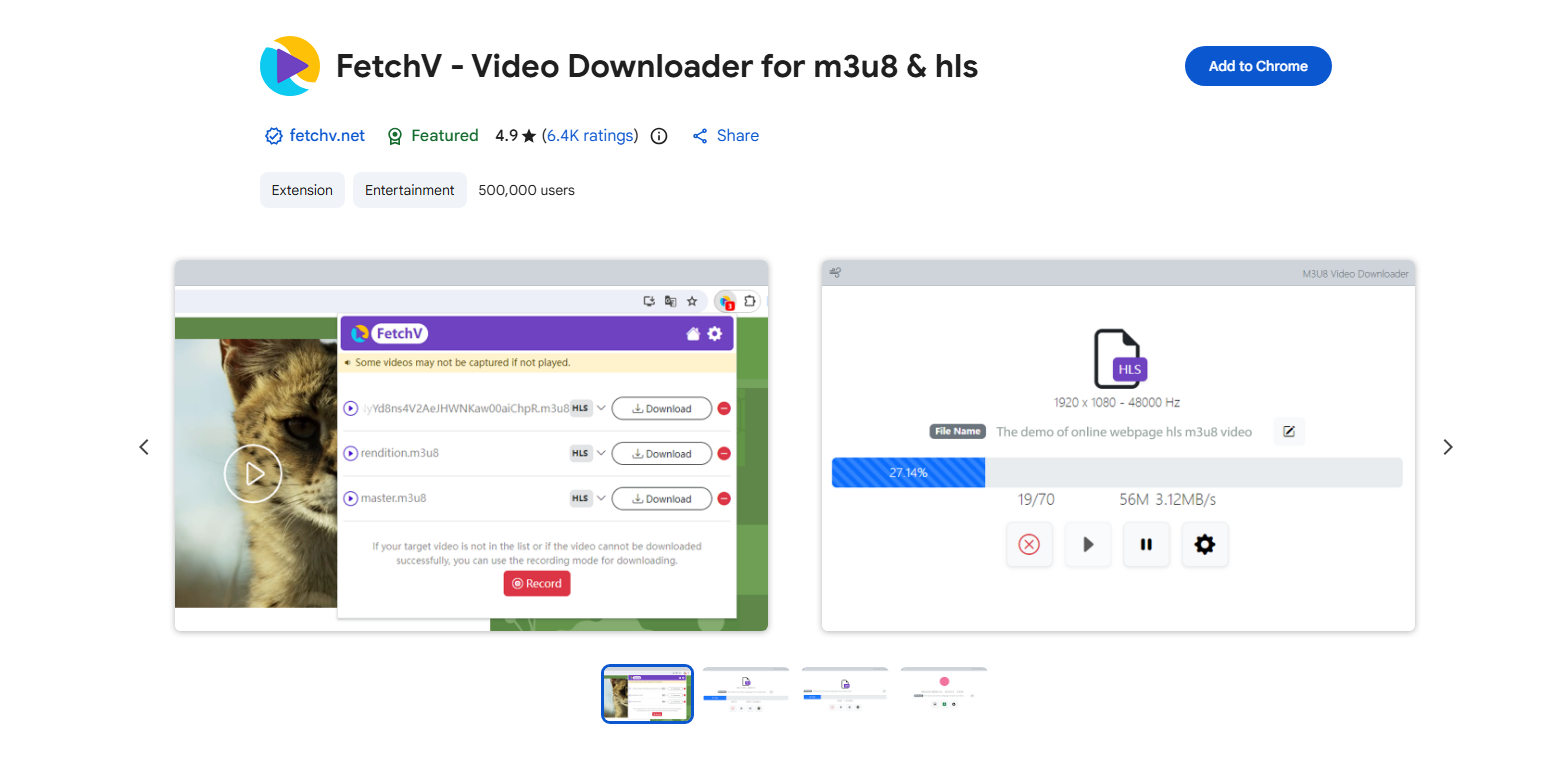
Étape 2 : Accédez à la vidéo du cours Udemy à laquelle vous avez accès, puis cliquez sur l’icône de l’extension FetchV.
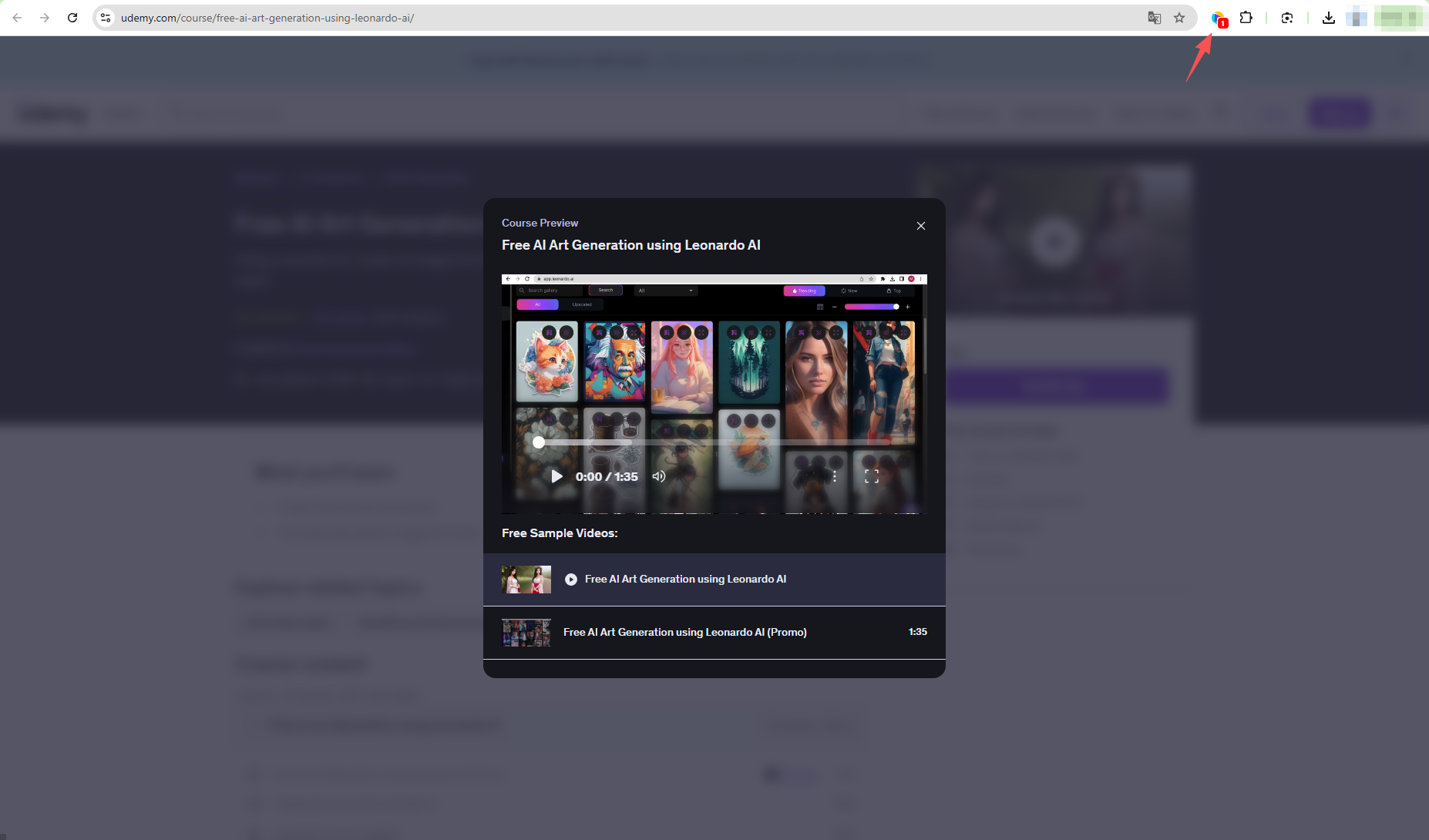
Étape 3 : FetchV détectera la vidéo du cours ; vous pourrez alors cliquer sur le bouton de téléchargement pour enregistrer le fichier.
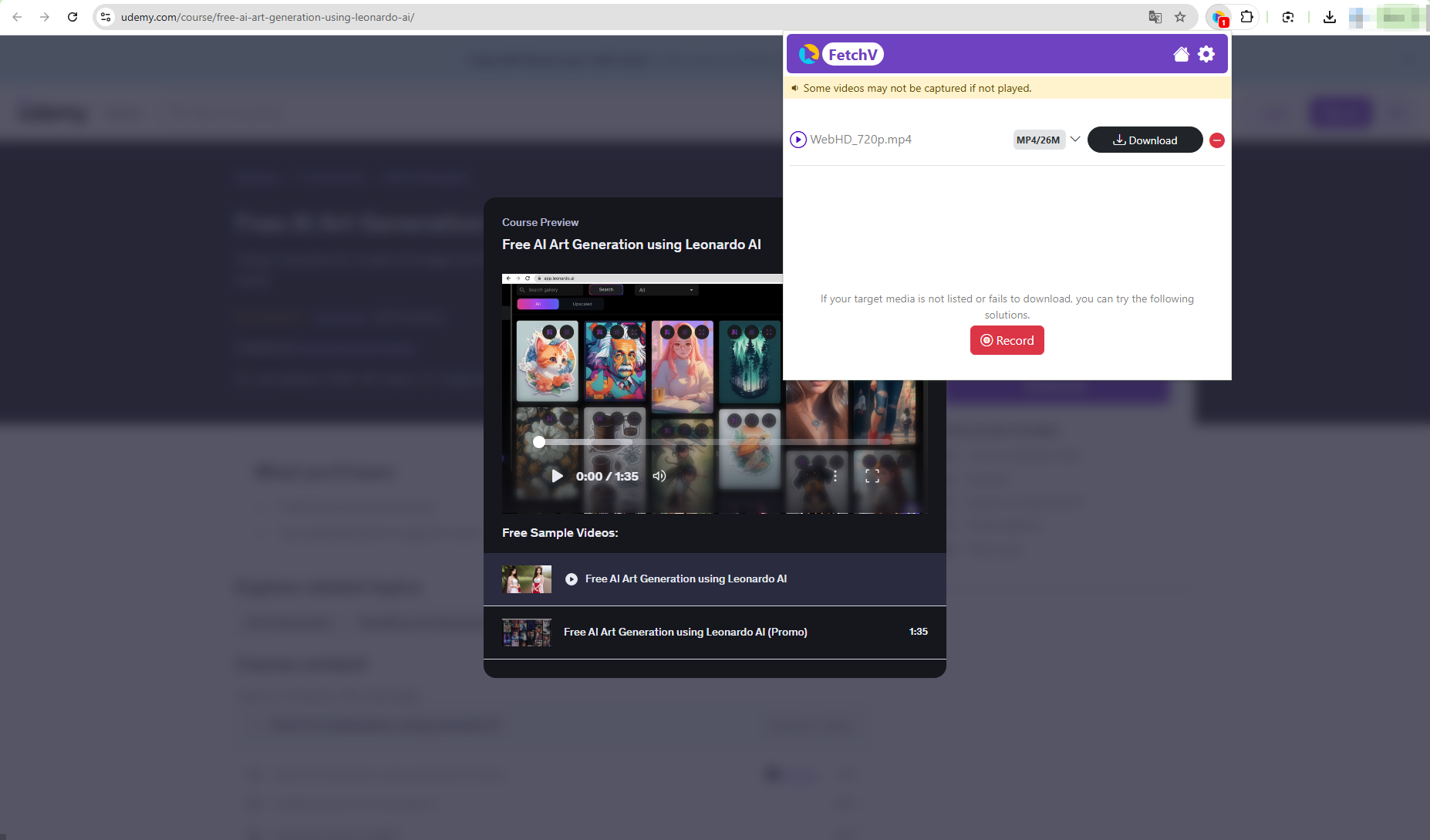
Étape 4 : Si le téléchargement de votre vidéo cryptée cible a échoué, cliquez sur le bouton Enregistrer pour commencer l’enregistrement de la vidéo du cours.
3. Avantages et inconvénients de FetchV
Avantages :
- Basé sur un navigateur et facile à prendre en main
- Aucune installation de logiciel lourd
- Utile pour les vidéos sans DRM ou légèrement protégées
- Convient aux téléchargements ponctuels
Inconvénients :
- Aucune fonctionnalité de téléchargement par lots
- Options de qualité et de format vidéo limitées
- Non conçu pour les grandes bibliothèques scolaires
- Peut ne pas fonctionner correctement avec des vidéos hautement protégées
Comme Udemy repose largement sur le streaming protégé, de nombreux utilisateurs trouvent FetchV instable pour le téléchargement de cours complets. Il peut fonctionner pour des leçons individuelles dans certains cas, mais il n'est pas optimisé pour les cours structurés comportant plusieurs leçons.
4. Essayez Ultimate Downloader pour télécharger des vidéos Udemy : Meget
Pour les utilisateurs qui souhaitent une solution plus fiable, efficace et facile à prendre en main, Meget est un bien meilleur choix que FetchV pour télécharger les vidéos Udemy auxquelles vous êtes autorisé à accéder.
Très Meget est un téléchargeur de vidéos professionnel conçu spécifiquement pour gérer les formats de streaming modernes et les contenus vidéo longs. Contrairement aux outils basés sur un navigateur, Meget offre un environnement dédié à la détection, au téléchargement et à la gestion des vidéos provenant des plateformes compatibles.
Il est particulièrement adapté aux contenus éducatifs, où les utilisateurs ont souvent besoin de télécharger plusieurs leçons, de maintenir la qualité et d'organiser efficacement les fichiers.
Caractéristiques principales de Meget :
- Prise en charge avancée des formats de flux segmentés
- Téléchargement groupé pour plusieurs leçons ou vidéos
- Préservation vidéo et audio de haute qualité
- Interface utilisateur simple et épurée
- Des téléchargements plus rapides et plus stables que les outils du navigateur
Comment télécharger des vidéos Udemy cryptées avec Meget :
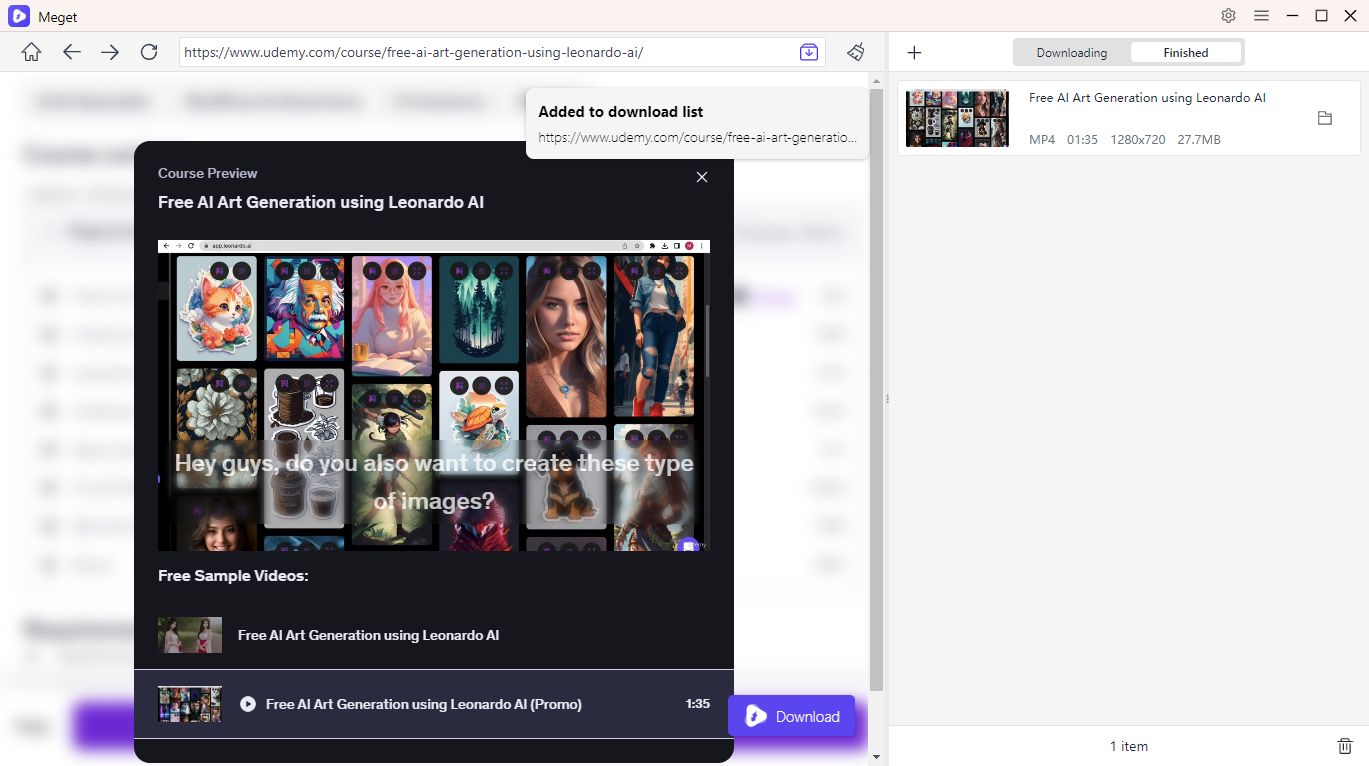
- Téléchargez et installez Meget sur votre ordinateur, lancez le programme et sélectionnez la résolution et le format vidéo de votre choix.
- Connectez-vous directement à votre compte Udemy depuis Meget, puis ouvrez les leçons du cours que vous souhaitez enregistrer.
- Il suffit de cliquer sur le bouton de téléchargement pour mettre les vidéos du cours en file d'attente de téléchargement dans Meget.
- Meget lancera automatiquement le téléchargement, et une fois celui-ci terminé, vous trouverez toutes les vidéos téléchargées, soigneusement organisées dans l'onglet « Fichiers ».
5. Conclusion
FetchV peut s'avérer utile pour télécharger certaines vidéos en ligne, mais ses limites sont évidentes pour les cours Udemy. L'absence de téléchargements par lots, l'incohérence des résultats et sa complexité technique le rendent inadapté aux apprenants sérieux qui souhaitent suivre des cours complets hors ligne.
Meget s'impose comme le téléchargeur idéal pour les vidéos Udemy cryptées que vous êtes autorisé à télécharger. Grâce à une gestion avancée des flux, la prise en charge du traitement par lots et une interface utilisateur intuitive, Meget vous fait gagner du temps et offre une expérience bien plus fluide que les outils basés sur un navigateur.
Pour les apprenants qui valorisent l'efficacité, la qualité et la simplicité, Très est la recommandation claire.
- How to Download Anime and Manga from MyAnimeList?
- Comment télécharger des films Vumoo ?
- Comment utiliser l'extension Media Downloader ?
- Comment extraire le son de YouTube ?
- Comment télécharger des films gratuits depuis 1movies.bz ?
- Comment télécharger des vidéos de cours d'anglais ?
- Meilleurs sites d'anime pour télécharger des vidéos